
Connect your AI agents to the apps you use
Denker uses Composio to connect AI agents to work apps through authorized tools. Connect an account in Settings → Integrations, then use the available tools to bring email, documents, project context, and other app data into your work.
Denker is an AI agent interface for working from your desktop. App integrations complement its on-screen interaction: they provide authorized service access when a task needs it. Available apps and actions depend on your account, the toolkit, and granted permissions.
How to connect an app to Denker
Find the app in Settings
Open Settings → Integrations in Denker. Search for the app you want to use and check whether a connection is already active.
Choose Connect
Start the connection from Settings, or choose Connect on a supported app suggestion. Denker opens the authorization flow in your browser.
Authorize the right account
Sign in to the service and review the requested permissions. Complete the authorization steps for the account you want Denker to use.
Confirm the connection
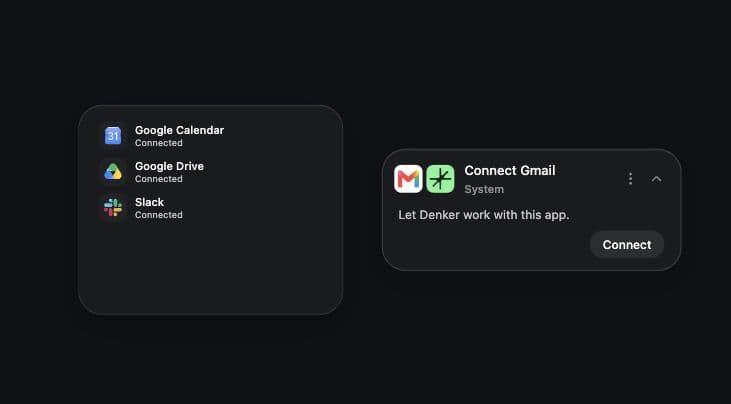
Return to Settings → Integrations and check that the app is connected. A Connection frame can also show your active connected apps on the canvas.
Connection suggestions, where you work
When you use a recognized, supported app that is not connected, Denker can suggest connecting it. The suggestion toast names the app and offers a Connect action that opens authorization in your browser.
The Connection frame serves a different purpose: it shows your active connected apps on the canvas. Use Settings → Integrations to search for apps and manage connections.
Explore app integrations
These links cover common work apps in Composio’s toolkit catalog. Each opens the service’s toolkit documentation, including its tools and authentication details. Search Settings → Integrations in Denker to check which connections are available to your account.

Gmail
Email
Email threads, messages, and drafts.
Toolkit documentation ↗

Outlook
Email
Microsoft email, contacts, and calendar context.
Toolkit documentation ↗

Slack
Team communication
Channel conversations and thread context.
Toolkit documentation ↗

GitHub
Development
Repositories, issues, and pull requests.
Toolkit documentation ↗

Linear
Project management
Issues, projects, and team priorities.
Toolkit documentation ↗

Notion
Knowledge
Pages, databases, and shared notes.
Toolkit documentation ↗

Google Calendar
Scheduling
Events, attendees, and availability.
Toolkit documentation ↗

Google Drive
Files
Files, folders, and shared documents.
Toolkit documentation ↗

Google Docs
Documents
Document content and structured writing.
Toolkit documentation ↗

Google Sheets
Spreadsheets
Spreadsheet rows, cells, and tables.
Toolkit documentation ↗

Google Tasks
Task management
Task lists, due dates, and follow-ups.
Toolkit documentation ↗

Salesforce
CRM
Customer records and sales context.
Toolkit documentation ↗

LinkedIn
Professional network
Profile information and publishing tools.
Toolkit documentation ↗
Explore more services in the Composio toolkit catalog or learn about the platform at Composio.
From app context to a clear task
Start with a concrete piece of work: a customer email that needs a reply, a Slack discussion that needs a summary, or a GitHub issue that needs investigation. Tell the agent what to use as context and what result you want. A connection makes the service available; your task supplies the purpose.
For example, ask for a reply draft based on an email thread, a meeting brief based on a calendar event and a document, or a project summary based on issues and team discussion. Check that the relevant tools are available for the task. See working across Gmail, Figma, and Sheets and Denker permissions and control.
AI agent integration questions
- Which apps can I connect to Denker?
- Search Settings → Integrations for the apps available to your Denker account. Denker uses Composio for app connections. The directory on this page links to Composio toolkit documentation; a toolkit listing alone does not establish that every action is available in Denker.
- What is the difference between an integration and computer use?
- An integration gives an agent access to a service through authorized tools. Computer use lets an agent work with visible software interfaces. The appropriate path depends on the task, the available tools, and the permissions you have granted.
- Does the Connect suggestion authorize an app automatically?
- No. Choosing Connect starts the authorization flow in your browser. You still select the account and complete the service's authorization steps before the connection is available.
- Where can I manage or disconnect an integration?
- Open Settings → Integrations to review and disconnect connected apps. The Connection frame shows active connections on the canvas; connection management happens in Settings.
- Does connecting an app make every action available?
- No. Available actions depend on the service, Composio toolkit, Denker's available tools, and the account permissions granted during authorization. Check the linked toolkit documentation and the task's available tools before relying on a particular action.